
Supplement your analytics with some cool website design visuals from online heat map tracking tools
If you want to know why your website design is, or is not performing, start conducting usability tests. A/B tests are great for content, but when it comes to seeing how users engage with your website, online heat map tracking tools can make all the difference.
Google Analytics is of course a resource for testing your content, but the difference between Google Analytics and heat map software is that heat map and click tracking software is based on coordinates. Google Analytics tracks clicks on a per-URL basis.
This means you might have a “download this report” link to your Rapid Conversion Landing Page within a button on the page, and you might also have it in the first paragraph. Google Analytics groups the results together in its report, rather than seeing them as two different entry points. Besides that, heat maps are just cool. And they’re great to present to non-technical people.
So you might be wondering where you can get one of these handy-dandy heat map tracking tools? Well, thanks to the ever-growing collection of tools on the web, there are several free and paid options.
[text_ad]
5 Heat Map Tracking Tools
CrazyEgg – Crazy Egg is a popular choice. It’s $29 a month at minimum, but they offer a free 30-day trial and several different visual types of click tracking, from heat maps, confetti view (offering search terms, top 15 referrers, operating system, browser, etc.), overlay and lists.
They allow you to create reports, share your data, block clicks from your own computer, and be alerted via email or RSS. $29 a month is a small price to pay for the service, and all you would need to do is use this service and decrease your bounce rates anywhere in your funnel by 1-5% to make the money back.
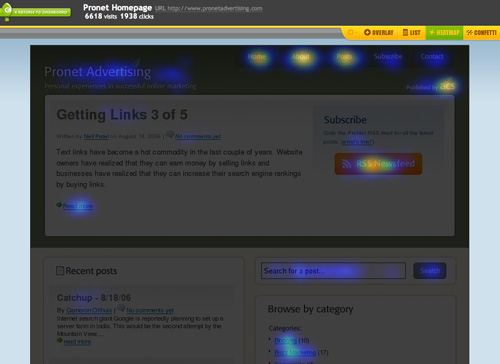
Heatmap.me is another solution with both free and paid options. If you want to test more than five pages, which is free, you can choose packages that start at $100 per month. It uses Javascript and does not log information from your visitors.
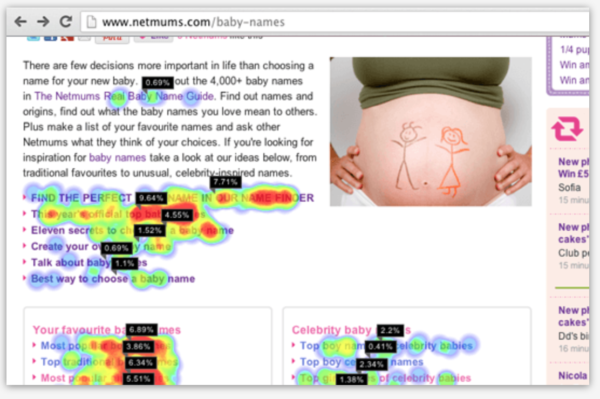
ClickHeat – If you just want to tinker with click tracking and have full control over it, you might consider installing this open source (free) piece of heat map software on your own server.

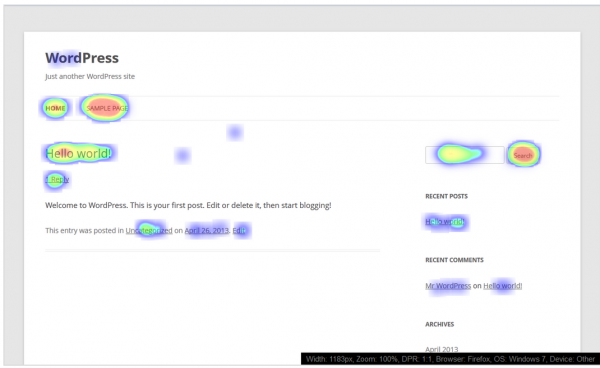
Hotspots Analytics WordPress Plugin – If you’re running on WordPress, this plugin includes basic heat maps and added analytics. According to their plugin description, “when the heat map is displayed, a HTML5 canvas drawing is overlaid on the website. An additional information panel is also provided at the bottom right of the screen which provides the current page width, browser, device etc. … If you resize the page width, a different heat map will be displayed. A width allowance setting can be changed to allow for some overlap in page widths.”
ClickTale – If you want to get really fancy, you can subscribe to ClickTale and get actual movies of your visitors’ browsing sessions. The benefit to this is that you can see where your visitors scrolled, whether they hesitated, hovered, etc. Most helpful though, you can see which fields in your forms users tend to abandon. Add an audio recorder, and this could be a great tool for in-house usability tests. They don’t offer public pricing on their site anymore, but last we checked it was around $99 per month and they do offer a free trial.
Have you tried any of these tools? Tried other ones? Share your experiences in the comments.
This article was originally published in 2009 and is updated frequently.





Guest posting not only helps to bring traffic, it also increases your trustworthiness as a writer…and it also helps to increase loyal readers. great job..
We have this tool http://www.miapex.com and I wanted to see if you would like to include it because the heatmaps features of it has more benefits than those you mentioned in this posts. Here are 3 reasons:
1. we are more accurate because we capture elements IDs of a page and compare to the click coordinates. You know how confusing it’d be when people find the clicks are in the wrong place;
2. we support cross-device monitoring, so the heatmap to any responsive website is not a problem
3. ours is connected to the data center features and this allows you to segment by the metrics analyzed there, like conversions, funnels, content groups, etc, combining with heatmap comparison, really a good tool for A/B testing and landing page designs.
I could keep going with the reasons why you should include us, but I won’t bore you with the details. If you’re interested, let me know.
I just launched http://heatmap.ca (August 7th, 2013) and it’s 100% Free.
I thought it was about time this type of service was available to all small to medium sized businesses as a free service. I am giving something back to the community. Enjoy!
Rob
I welcome your feedback and if you have any questions, let me know.
This is not a limited tool…you get 500,000 clicks per month, Unlimited Views, you can monitor 100 pages per month across multiple domains.
It generates Click Heatmaps and offers Click and Tap Playback! It works with Fluid layouts so it will playback a user session if they are on a Mobile device or desktop computer. If you have media queries that change the layout on the page, we have a feature where you can enable Dynamic Content on the page and then apply the Heatmap or Play user sessions to reveal additional hot points on those dynamic elements (drop down lists, dialogs, etc)! Playback overlays a path with arrows (click 1,2,3 etc). There is even an instant playback speed. The Dashboard runs on your site and works on a Smart Phone or Desktop computer. At heatmap.ca there is a page of visual analytics including clicks by Country, State, City, Time of Day, Day of week, Tablets, Phones, etc.
Hard not to agree with the things you said about heatmaps. They are indeed very cool and they showcase the results in an easy to understand way. I wanted to add to the mix yet another tool from the toolset offered on http://usabilitytools.com/ . Not only is it affordable (plus everyone gets a free credits pack after signing up), but also they offer some really unique features like “reversed heatmap” – your page is darkened and the popular areas are revealed. It is really motivating to see it that way – because you want to “reveal” the whole website by making more areas popular. Cheers and keep up the good work.
Another great tool is IntuitionHQ.com.
Check out more on our blog http://j.mp/nIqLlC
Thanks for this post. I used Crazy Egg on a couple of sites I had a couple of years ago. So I thought I would see if there was any other products in the marketplace.
Thanks for your post, it answered my questions!
Inigo, we agree with what you’re saying in regards to small businesses. However, our primary readership includes publishers with hundreds of thousands, to millions of visitors per month.
As Michael has said above, for small business owners the free services provided by Google Analytics are usually more than enough, for two reasons:
a) Small company websites simply do not need this amount of feedback about visitors, and do not have the know how, time, or incentive to make subtle and arcane alterations to their sites based on this feedback.
b) Unless your visitors are in the thousands-per-month, the images produced by these systems will not give limpid results. They work using the law of averages, meaning the more data entered, the clearer the results. Below a certain level, the results are all but meaningless, and certainly not something you would use as reason to make any major changes to your site.
thank you just what I was looking for
Hi Michael,
As mentioned, these are simply complimentary additions to what Google Analytics offers. Definitely not a replacement 🙂
– Amanda
Just as a note, Google Analytics has Click Map Tracking on the newest version of their Analytics script (ga.js). It does not track clicks on non-links, but the majority of people who would be using click map tracking do not care as much about the non-link clicks as they care about the link clicks. It is 100% free, and should be included as an alternative to the paid options you have mentioned above as it serves a much broader audience with bigger advantages.